|
|
|
| Page Hits : 11152 |
|
 |
Mercantile Exchange Blog |
 |
 |
| |
Jul 24 2013 |
| Did You Know? - Fact 11 |
How to Import Newly Introduced Contracts to Watchlist from the Manage Symbol Option?
Despite the active Watchlist dialog box in the trading console displaying the selected contracts from the Manage Symbol option, the newly added contracts in the MEX’s trading console are not shown by the active Watchlist dialog box, by default.
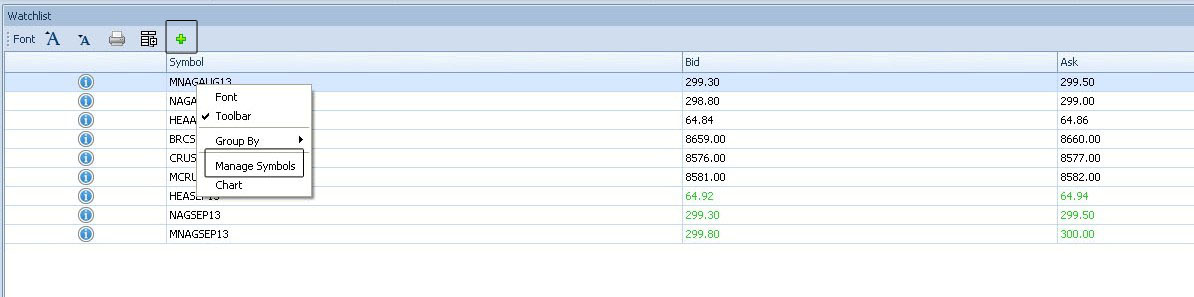
To see the newly added contracts, users have to open the Manage Symbol dialog box or select the "+" sign at the top of the Watchlist and select the newly added contracts which the user wants to be displayed in the Watchlist. Only then the newly added contracts can be viewed in the Watchlist.
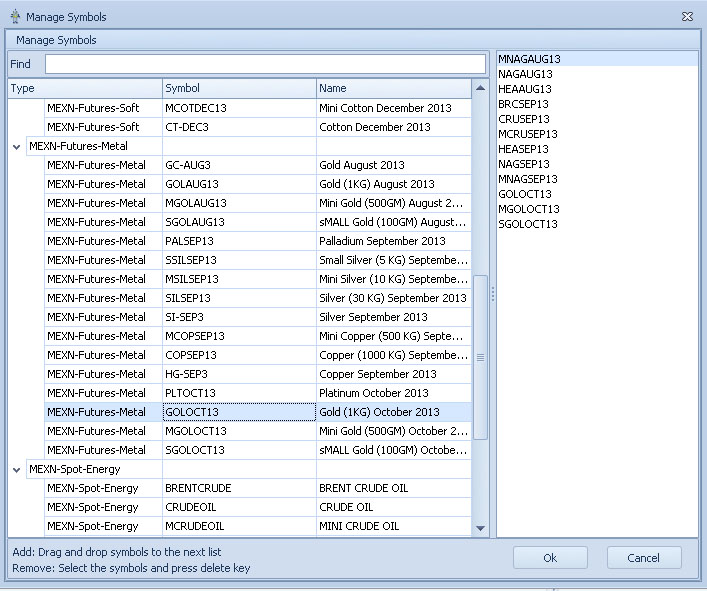
Further, the traders are recommended to regularly update the contracts in the Watchlist using the Product Calendar of MEX Nepal.
|
|
|
| Posted by at 12:13:13 PM |
| -------------------------------------------------------------------------------------------------------------- |
|
| Leave a Reply |
 77 Visit(s) |
|
|
|
|
| |
0 Comment(s) |
|
|
Blog Home |
|
 |
|
|
 |
|
|
|
|
|


