|
|
|
| Page Hits : 11152 |
|
 |
Mercantile Exchange Blog |
 |
 |
| |
Jul 17 2013 |
| Did You Know? - Fact 9 |
How to Identify the Contracts as Spot or Futures?
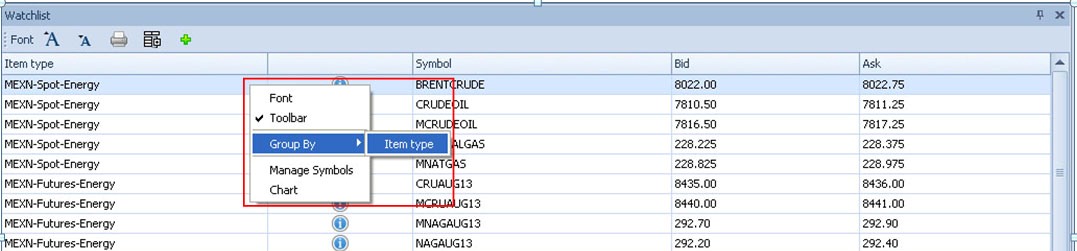
By default, the Watchlist will not group the contracts as spot or futures. In order to identify the contract as Spot or Futures, the user needs to right click anywhere on the Watchlist and select the option of Group By and then Item type as displayed below.
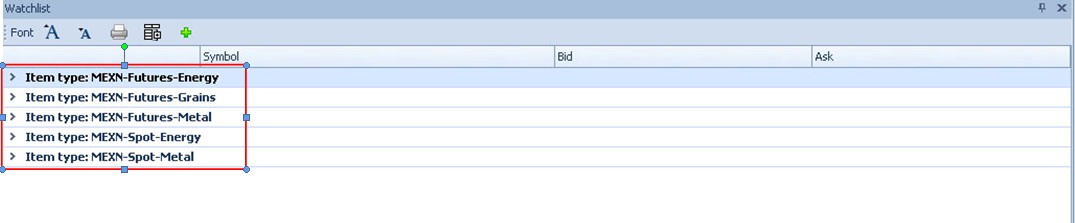
After clicking on this option, the Watchlist will categorize the contracts as Spot or Futures as displayed below.
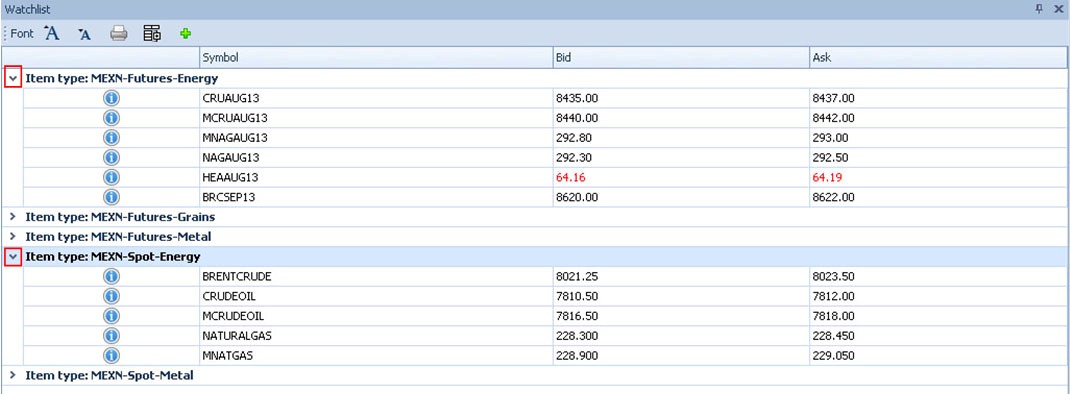
Upon clicking the arrow (as highlighted in the red box below), besides the name of the category, the contracts listed under the corresponding category will be displayed. Upon clicking the arrow again, the contracts listed will be hidden.
|
|
|
| Posted by at 12:16:00 PM |
| -------------------------------------------------------------------------------------------------------------- |
|
| Leave a Reply |
 35 Visit(s) |
|
|
|
|
| |
0 Comment(s) |
|
|
Blog Home |
|
 |
|
|
 |
|
|
|
|
|


